Editing has become faster, smarter, and more automated — but one thing that hasn’t changed is — the value of sitting down and mapping a story on paper.
In the rush to get content out, a lot of people skip this stage. They shoot first, hoping to “find the story in the edit.” It’s a terrible idea and a fast way to waste days staring at a timeline wondering why nothing flows.
That’s where the paper edit comes in — a deceptively simple but powerful step that separates professionals from amateurs.
What a Paper Edit Actually Is
A paper edit is the blueprint of your film before you even touch the timeline. It’s the point where you decide what needs to be said, where each idea sits, and what visuals you’ll need to support it.
In a traditional setup, that means text on one side of the page (the script or interview bites) and visuals on the other (what you’ll see on screen). The moment you do this, you start thinking structurally — which means you start editing with intent instead of instinct.
Why I Built Paper Editor Pro
I’ve made hundreds of short films, branded docs, and all sorts, and I got tired of juggling Word docs, shot lists, and scribbles on Post-its — and sometimes not planning at all. So I built a simple browser-based tool called Paper Editor Pro — something clean, modern, and genuinely useful.
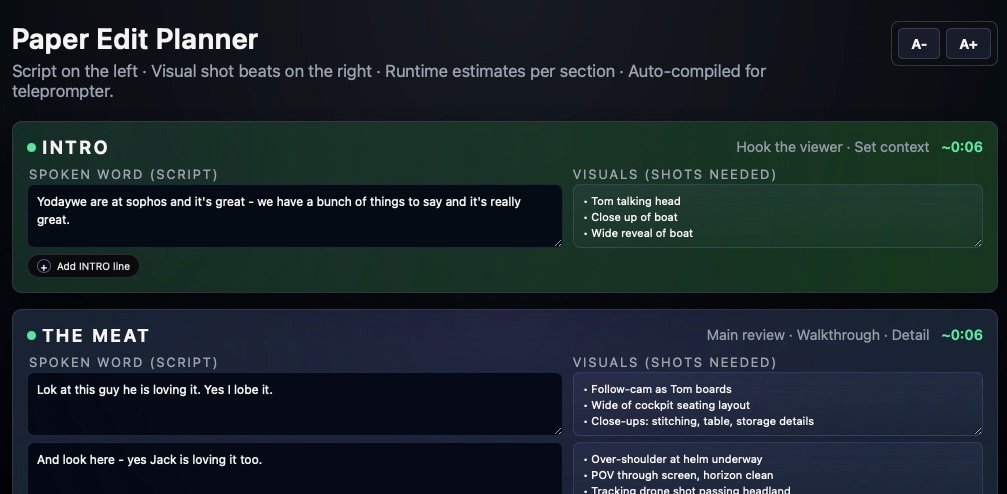
You just type your script lines on the left, add your visual notes or shot ideas on the right, and the tool automatically estimates runtime, formats everything neatly, and even compiles the full script for your teleprompter.
It’s not designed to impress software reviewers — it’s designed to make sense to anyone who’s ever had to assemble a story under pressure.
A Simple Layout That Mirrors Real Workflow
I hate reading huge chucks of text on a page. I don’t want any film prep to remind me of reading the “description” in Lord of the Rings.
The layout reflects the natural rhythm of a short-form film:
- Intro – your hook and context.
- The Meat – main content, walkthrough, or interview.
- Sign-off – wrap-up and call-to-action.
Each section expands with a click. You can add lines, drop in visuals, and see estimated runtimes update in real time (based on average speech speed).
When you’re done, hit Copy All and you’ve got a ready-to-use text version for your teleprompter — or export it straight to a printable PDF for the production team. Plus you can save and load files, which is mega.
It’s faster than juggling five different tools, and it keeps everyone — writer, editor, and camera crew — literally on the same page.
Why It Matters
Good edits don’t come from better software; they come from better thinking. A paper edit forces clarity early on. It exposes what’s missing before you’ve sunk hours into cutting. It also helps you visualise pacing — you can literally see if your intro drags or your ending comes too fast.
Even in an age of AI transcription and auto-cutting, you still need to know what your story is about. The paper edit isn’t old-fashioned — it’s the skeleton every modern workflow still hangs on.
The Goal
Paper Editor Pro isn’t trying to replace creativity. It’s there to clear the clutter so you can focus on story, tone, and rhythm.
It gives you a bird’s-eye view of your project — before you dive into the edit suite and lose perspective.
If you’re a filmmaker, content creator, or anyone who wants to structure a piece before cutting, it’s the simplest way to keep control of your story.